Letter
This API allows customers to create letters. The effect of creating a letter is the same as creating a letter in the user interface. Content can be added using HTML & CSS. Placeholders created in Canvas will not be respected.
Authentication #
The Letter API uses the existing Canvas OAuth authentication flow, so you can simply post to the existing auth token endpoint /auth/token/
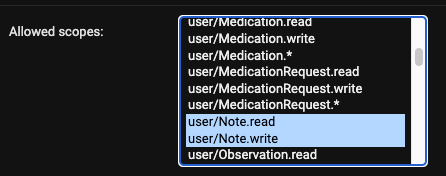
This endpoint was built as an addition to the Note API, and creating a letter needs the user/Note.write scope. This scope will not be in OAuth applications that were created prior to the release of the Note API. To get access:
- Create a new OAuth application
- Ask Canvas to add the new scopes to an existing OAuth application
Like the Note API, the Letter API is a staff API. It refuses tokens with a patient context and tokens that act as a user who isn’t a staff member, with 401 Unauthorized. See Tokens with a patient context.
import requests

url = "https://<your-instance>.canvasmedical.com/auth/token/"

payload = 'grant_type=client_credentials&client_id=canvas&client_secret=canvas'
headers = {
  'Content-Type': 'application/x-www-form-urlencoded'
}

response = requests.request("POST", url, headers=headers, data=payload)

print(response.text)
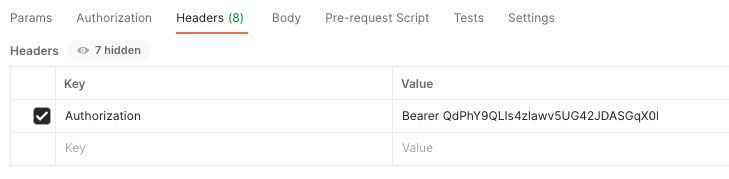
Then use your token in the request headers as you do with the FHIR API:
Create #
To create a Note resource, POST to https://<your-instance>.canvasmedical.com/core/api/letter/v1/Letter using the supported attributes below. Letters will be staged on the patient’s chart to then be faxed or printed. Further edits can be made in the UI as needed.
Attributes #
patientKey (req) text
The unique key of the Patient for which this letter is written.
providerKey (req) text
The unique key of the Provider staff who is responsible for the letter.
practiceLocationKey (req) text
The unique key of the PracticeLocation for which this letter is written.
content
The contents of the letter. Supports HTML & CSS. Placeholders created in Canvas will NOT be respected.
Example #
import requests
import json

url = "https://<your-instance>.canvasmedical.com/core/api/letter/v1/Letter"

payload = json.dumps({
  "patientKey": "8d84776879de49518a4bc3bb81d96dd4",
  "providerKey": "5eede137ecfe4124b8b773040e33be14",
  "practiceLocationKey": "c67e0c59-d4d2-428c-bc13-b6e85d181ad0",
  "content": "<p>To Whom It May Concern,</p><p>Letty Letters is a patient of mine at PRACTICE NAME. Due to a current medical condition, the patient is unable to fulfill the requirements for jury duty.</p><p>Thanks,</p></div><div class=\"signature\"><img src=\"https://upload.wikimedia.org/wikipedia/commons/thumb/b/be/Zhu_Zhengting_signature.jpg/1280px-Zhu_Zhengting_signature.jpg\" alt=\"Signature\" width=\"200\"></div></div></html>"
})
headers = {
  'Authorization': 'Bearer HqFtbSnBNX4S65VhRrg8sRxO6XcSFp',
  'Content-Type': 'application/json'
}

response = requests.request("POST", url, headers=headers, data=payload)

print(response.text)
Populating a letter with chart data #
Letter Template placeholders cannot reach command values or ICD codes from a note; only the fixed set of patient, provider, and practice placeholders is supported. To produce a letter populated with chart data, command values, or ICD codes, build the letter’s content in a plugin from values you read through the SDK data module, then create the letter with this API.