Handlers & Protocols
The handlers module lets you define workflows and workflow automations. Handlers respond to Events and return zero, one, or many Effects.
ClinicalQualityMeasure is a specialized handler base class for clinical protocols — see ClinicalQualityMeasure below.
Contents #
BaseHandler #
BaseHandler is the abstract base class all handler implementations inherit from. It provides the lifecycle and surface area plugin authors implement for event-driven handlers.
Purpose & lifecycle #
- The framework will call
compute()on the handler instance when an event should be handled.compute()must return a list ofEffectobjects that the runtime will apply. - Handlers must override the
compute()method.
Constructor and attributes #
Your handler should inherit from
BaseHandlerand define the following:RESPONDS_TO— TheEvent(s)that trigger the handler.compute— The method that handles the Event and returns a list of Effects.
Instance attributes available to handler authors:
self.event— TheEventinstance.self.secrets— Secrets provided to the handler (defaults to {}).
Example #
from canvas_sdk.handlers.base import BaseHandler
from canvas_sdk.events import EventType
from canvas_sdk.effects.task import AddTask

class SimpleFollowUpHandler(BaseHandler):
    RESPONDS_TO = EventType.Name(EventType.IMAGING_REPORT_CREATED)

    def compute(self):
        # Use self.event, self.secrets
        patient_id = self.event.context["patient"]["id"]
        imaging_report_id = self.event.target.id

        # Create a follow-up task effect
        return [AddTask(patient_id=patient_id, title="Follow-up", linked_object_type=AddTask.LinkableObjectType.IMAGING, linked_object_id=imaging_report_id).apply()]
ClinicalQualityMeasure #
ClinicalQualityMeasure is the base class for clinical quality measure (CQM) protocols. CQMs are patient-centric protocols used to evaluate, detect, or surface clinical conditions, gaps in care, and population-level metrics. Plugin authors create concrete subclasses that implement the clinical logic and return Effects in response to incoming Events.
When using ClinicalQualityMeasure, you have the option to utilize the Campaigns module in Canvas. However, the ClinicalQualityMeasure must return a single ProtocolCard effect in order to for patients to be included in the population for that CQM.
Meta properties #
Subclasses should populate the Meta inner class. Common meta fields include:
title(str): Human-readable title for the protocol.identifiers(list[str]): One or more external identifiers for the measure (for example, CMS/QDM ids). These will show in the subtitle of the protocol card.description(str): A short description of what the measure evaluates.information(str): Longer contextual information or rationale.references(list[str]): Links or identifiers for authoritative references. These are visible in the info button on the protocol card.source_attributes(dict[str, str]): Map of the 13 or 31 source attributes that certified health IT developers must reference when implementing DSI or PDSI. These are visible in the info button on the protocol card.types(list[str]): Tags or classification strings for the measure, like “CQM” or “HCC”. These are visible in the subtitle of the protocol card.authors(list[str]): Authors or maintainers of the protocol.show_in_chart(bool): Determines whether the protocol card will show on the patient’s chart.show_in_population(bool): Determines whether the protocol will be included in the Campaigns module of Canvas.can_be_snoozed(bool): Determines whether a user can snooze the protocol card to be addressed at a later date.is_abstract,is_predictive(bool): Behavioral flags for the framework.
Key methods #
timeframe(property) ->Timeframe- Provides the default timeframe used by the protocol when searching for relevant events or records. The default implementation returns a timeframe with a start one year before now and an end at the current time. Subclasses can override this property to adjust the window of interest.
relative_float(value: str) -> float- Parses comparison-style numeric strings that may include relational prefixes like
<,<=,>or>=. Returns a float adjusted slightly (±1e-6) for strict<or>operators so comparisons can be expressed without ambiguity. If parsing fails, returns0.
- Parses comparison-style numeric strings that may include relational prefixes like
patient_id_from_target()-> strReturns the id of the patient that the event’s target record belongs to. For
PATIENT_*events, the target is the patient. For other supported events, the method looks up the target record and returns its patient. The first call caches the patient id, so later calls don’t query the database again. Supported events:Events Target record BILLING_LINE_ITEM_CREATED,BILLING_LINE_ITEM_UPDATEDBillingLineItem CONDITION_ASSESSED,CONDITION_CREATED,CONDITION_RESOLVED,CONDITION_UPDATEDCondition IMAGING_REPORT_CREATED,IMAGING_REPORT_UPDATEDImagingReport INSTRUCTION_CREATED,INSTRUCTION_UPDATEDInstruction INTERVIEW_CREATED,INTERVIEW_UPDATEDInterview LAB_ORDER_CREATED,LAB_ORDER_UPDATEDLabOrder LAB_REPORT_CREATED,LAB_REPORT_UPDATEDLabReport MEDICATION_LIST_ITEM_CREATED,MEDICATION_LIST_ITEM_UPDATEDMedication PATIENT_CREATED,PATIENT_UPDATEDPatient PROTOCOL_OVERRIDE_CREATED,PROTOCOL_OVERRIDE_UPDATEDProtocolOverride REFERRAL_REPORT_CREATED,REFERRAL_REPORT_UPDATEDReferralReport - Canvas doesn’t send
PROTOCOL_OVERRIDE_DELETED. When an override is removed, the protocol receivesPROTOCOL_OVERRIDE_UPDATED. - The method still returns the patient when the target record has been deleted. Removing a command from a note deletes the command’s record and sends an
*_UPDATEDevent, such asINSTRUCTION_UPDATEDorINTERVIEW_UPDATED, so a protocol can recompute for that patient. - The method raises a
ValueErrorwhen the event type isn’t in this table, when no record has the target’s id, or when the target record has no patient. An interview, for example, can exist without a patient.
Example — react to a lab report #
This example shows a protocol that reacts to LAB_REPORT_CREATED events, uses patient_id_from_target to determine which patient the report belongs to, and emits an Effect when a particular lab value is out of range. Note the example avoids heavy synchronous DB work and emits an Effect for the platform to handle asynchronously.
from datetime import datetime

from canvas_sdk.commands import TaskCommand
from canvas_sdk.effects.protocol_card import ProtocolCard
from canvas_sdk.events import EventType
from canvas_sdk.protocols.clinical_quality_measure import ClinicalQualityMeasure


class AbnormalPotassiumMeasure(ClinicalQualityMeasure):
    """Detects clinically significant potassium abnormalities and surfaces follow-up tasks."""

    class Meta:
        title = "Abnormal Potassium Alert"
        identifiers = ["CQM-K-001"]
        description = "Creates a task recommendation when a potassium lab report shows hypokalemia or hyperkalemia."
        information = (
            "Detects clinically significant potassium abnormalities and surfaces follow-up tasks."
        )
        references = ["Potassium Guideline https://example.org/guideline/potassium"]
        source_attributes = {"Canvas Medical": "Canvas Medical https://www.canvasmedical.com"}
        types = ["CQM"]
        authors = ["Clinical Team"]
        show_in_chart = True
        show_in_population = True
        can_be_snoozed = False
        is_abstract = False
        is_predictive = False

    RESPONDS_TO = EventType.Name(EventType.LAB_REPORT_CREATED)

    def compute(self):
        # Resolve patient id (cached on first call)
        patient_id = self.patient_id_from_target()

        # Read the lab report values from the event target (avoid extra DB queries here)
        report = self.event.target
        potassium_value = report.get_value('potassium')  # simplified accessor

        # Use relative_float to safely parse any comparator-style values
        k = self.relative_float(str(potassium_value))

        if k < 3.5 or k > 5.5:
            # Emit an effect — e.g., create a task. Keep heavy work to platform handlers.
            task = TaskCommand(
                title="Follow-up on abnormal potassium",
                due_date=datetime.now().date(),
            )
            return [
                ProtocolCard(
                    patient_id=patient_id,
                    title=f"Abnormal potassium: {k}",
                    due=datetime.now(),
                    key="abnormal_potassium",
                    narrative="Talk to patient about potassium",
                    recommendations=[task.recommend(title="Follow-up on abnormal potassium")],
                ).apply()
            ]

        return []
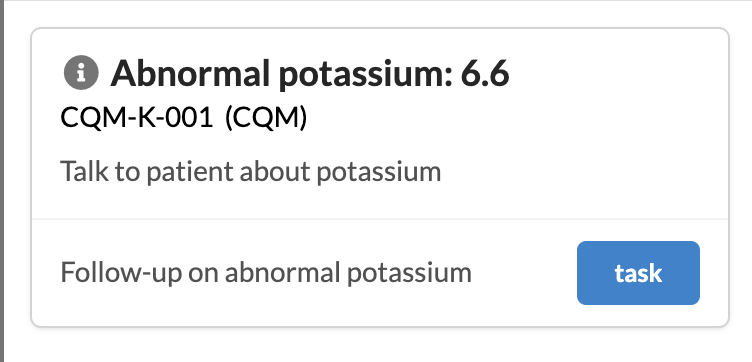
When a CQM protocol that returns a single ProtocolCard effect is uploaded to Canvas, you can select the protocol as an option in the Campaigns module and view the population of patients, create campaigns, etc. More details on Populations and Campaigns can be found here.
Caveats & notes #
- Timeframe: by default the protocol looks at the 1-year window prior to now. Override
timeframeif your measure requires a broader or narrower lookback. - Patient id resolution:
patient_id_from_target()supports only the events listed under Key methods. Check that the events your protocol responds to are listed there. - Event-driven handlers should avoid expensive synchronous DB operations inside their event handler. When possible, emit Effects that are handled asynchronously by the platform.
 Questions? Create an issue.