Namespace Lifecycle
Every plugin that uses custom data operates within a namespace — an isolated PostgreSQL schema that holds the plugin’s AttributeHubs and CustomModels. During iterative development, namespaces accumulate tables, columns, and data that can get in the way. This page explains how namespaces are created and managed, and how to use the Canvas CLI to inspect and clean up namespaces as you work.
Namespace Naming Rules #
Namespace names use the format org__name (two parts separated by a double underscore). Each part must start with a lowercase letter and contain only lowercase letters, digits, and single underscores. The total length must not exceed 63 characters (PostgreSQL’s identifier limit).
Examples of valid names: acme__shared_data, myorg__analytics
How Namespaces Are Created #
A namespace is created automatically when the first plugin with "access": "read_write" is installed into it. The installation process:
- Creates a PostgreSQL schema named after the namespace
- Generates two authentication keys (
namespace_read_access_keyandnamespace_read_write_access_key) - Stores the keys as secrets in the plugin
- Creates any CustomModel tables defined by the plugin
Subsequent plugins can join the namespace with the appropriate access key. See Sharing Data for details on multi-plugin namespaces.
Installation Flow #
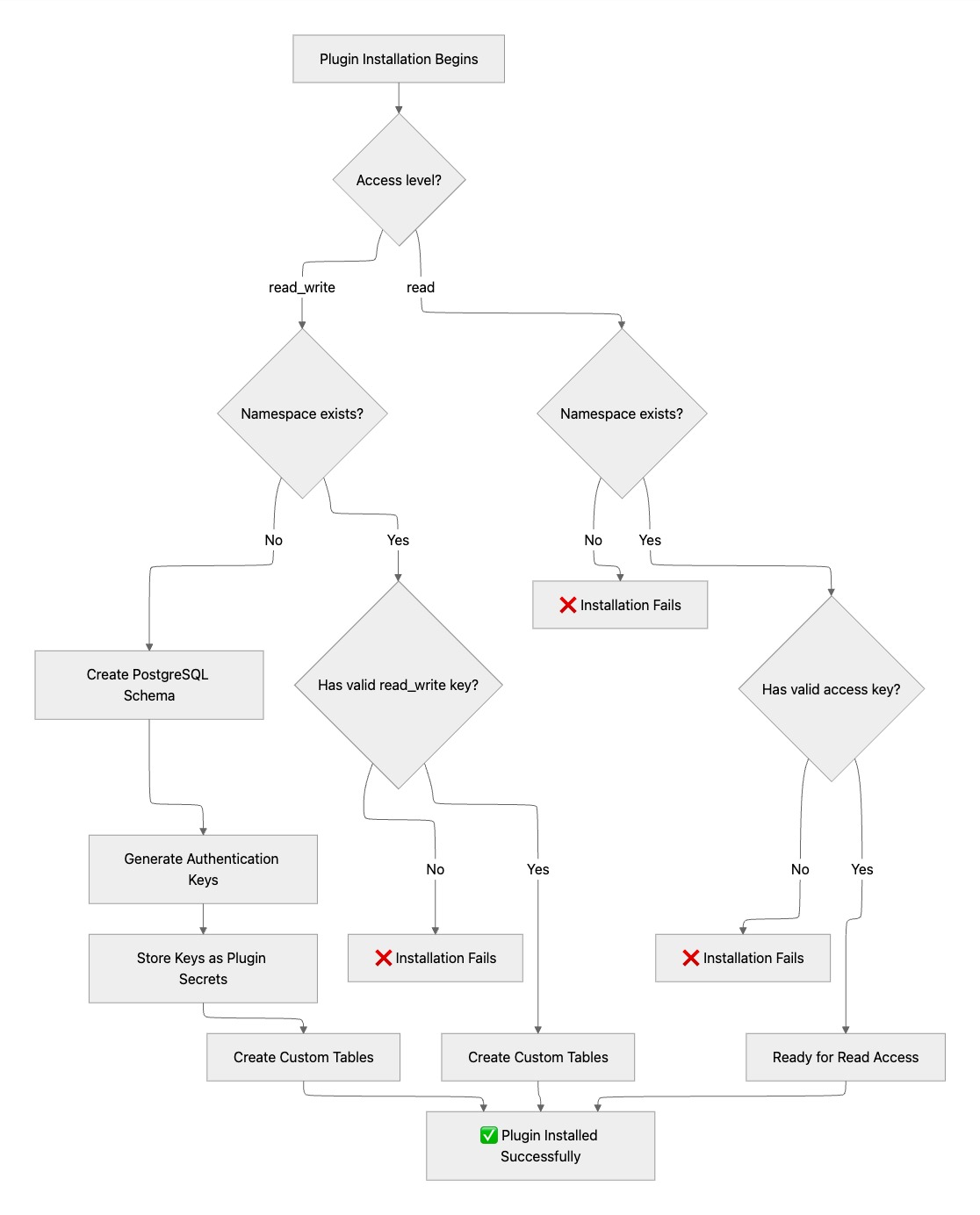
The path depends on the declared access level and whether the namespace already exists:
| Declared Access | Namespace Exists | Key Provided | Result |
|---|---|---|---|
read_write | No | N/A | Creates namespace and tables |
read_write | Yes | Valid read_write_access_key | Plugin installed, tables created |
read_write | Yes | Invalid or missing | Installation fails |
read | Yes | Valid read_access_key | Plugin installed with read access |
read | No | N/A | Installation fails |
read | Yes | Invalid or missing | Installation fails |
Development Workflow #
When developing a plugin with custom data, you’ll typically iterate through cycles of changing your models, reinstalling the plugin, and testing. Each reinstall can leave behind tables from previous iterations — renamed models leave orphaned tables, and test data accumulates. The canvas namespace CLI commands let you inspect what’s in a namespace and clean it up without having to connect to the database directly.
Typical Iteration Cycle #
- Edit your CustomModel definitions or manifest
- Reinstall the plugin:
canvas install my_plugin --host dev-instance - Test your changes
- If models were renamed or removed, use
canvas namespace resetto clean up orphaned tables - Repeat
CLI Commands #
All namespace commands require a running Canvas instance. Pass --host to specify which instance to connect to.
Listing Namespaces #
See all custom data namespaces on an instance:
canvas namespace list --host dev-instance
Output shows each namespace with its total table count and the number of custom (non-system) tables:
acme_corp__shared_data    tables: 7    custom: 3
acme_corp__analytics      tables: 5    custom: 1
Inspecting a Namespace #
View the tables and columns in a specific namespace:
canvas namespace inspect acme_corp__shared_data --host dev-instance
Output separates system tables (managed by the framework) from custom tables (defined by your plugin), and shows column details for custom tables:
Namespace: acme_corp__shared_data

System tables:
  namespace_auth       ~2 rows
  schema_version       ~2 rows
  custom_attribute     ~150 rows
  attribute_hub        ~3 rows

Custom tables:
  customnote   ~25 rows
    dbid     bigint    not null
    title    text      nullable
    body     text      nullable
  specialty    ~8 rows
    dbid     bigint    not null
    name     character varying    nullable
This is useful for verifying that your models were created correctly after installation, or for understanding what’s in a namespace before deciding whether to reset or drop it.
Resetting a Namespace #
Reset drops your custom tables and truncates the data in system tables, but preserves the namespace itself and its authentication keys. This is the right choice when you want to start fresh with your models while keeping the namespace intact for reinstallation.
By default, reset runs in dry-run mode and only shows what would happen:
canvas namespace reset acme_corp__shared_data --host dev-instance
Namespace: acme_corp__shared_data

Custom tables to drop:
  customnote    ~25 rows
  specialty     ~8 rows

Data tables to truncate:
  custom_attribute    ~150 rows
  attribute_hub       ~3 rows

This is a dry run. To execute, re-run with --execute
To actually perform the reset, add --execute. You will be prompted to confirm by typing the full namespace name:
canvas namespace reset acme_corp__shared_data --host dev-instance --execute
This will reset namespace 'acme_corp__shared_data'. This cannot be undone.
Type the full namespace name to confirm: acme_corp__shared_data

Namespace 'acme_corp__shared_data' has been reset.
  Dropped tables: customnote, specialty
  Truncated tables: custom_attribute, attribute_hub
After a reset, reinstall your plugin to recreate the tables with your updated model definitions.
Dropping a Namespace #
Drop removes the entire namespace — the schema, all tables, all data, and all authentication keys. Use this when you want to completely remove a namespace and start over, or when you’re done with a development namespace and want to clean up.
Dry-run mode (default):
canvas namespace drop acme_corp__shared_data --host dev-instance
Namespace: acme_corp__shared_data

All tables that will be dropped:
  attribute_hub        ~3 rows
  custom_attribute     ~150 rows
  customnote           ~25 rows
  schema_version       ~4 rows
  namespace_auth       ~2 rows
  specialty            ~8 rows

This is a dry run. To execute, re-run with --execute
To execute:
canvas namespace drop acme_corp__shared_data --host dev-instance --execute
After a drop, the next plugin installation with that namespace name will create it from scratch, generating new authentication keys. Any other plugins that were sharing the namespace will need to be reconfigured with the new keys.
When to Reset vs. Drop #
| Scenario | Command |
|---|---|
| You renamed or removed a CustomModel and want to clean up the old table | reset |
| Test data has accumulated and you want a clean slate | reset |
| You changed your namespace name in the manifest | drop the old, then reinstall |
| You’re done developing and want to remove all traces | drop |
| Other plugins share this namespace and you want to preserve their access | reset (keys are preserved) |
| You want to regenerate the namespace authentication keys | drop, then reinstall |
See Also #
- Quick Start - Get started with custom data in 10 minutes
- CustomModels - Define structured database tables
- Sharing Data - Share data between plugins
- Testing - Automated tests for custom data
- Design Considerations - Choosing the right approach
 Questions? Create an issue.