Protocol Card
Protocol cards appear on the right-hand-side of a patient’s chart, and can be accessed by clicking on the Protocols filter button in the filter menu.
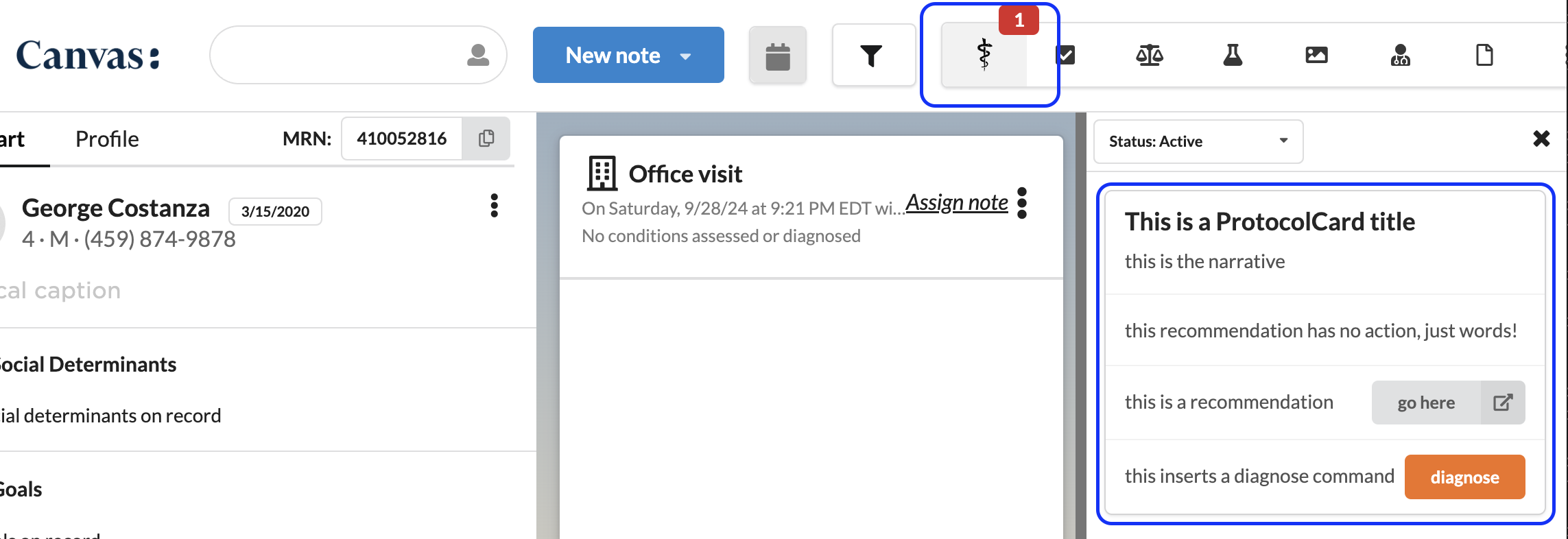
A Protocol card consists of three main parts:
- A title, which appears at the top in bold
- A narrative, which appears just below the title to add any additional clarifying information
- A list of recommendations, which each have a title and optionally a button that can either:
- open a new tab and navigate to another site
- insert commands into a note
Build a ProtocolCard with the attributes you want to set, add any recommendations, then return its apply() from your handler.
Methods #
apply() → Effect #
Creates the protocol card, or updates the existing card with the same patient and key.
keyis required.- Exactly one of
patient_idorpatient_filteris required. - The existing card is matched on patient,
key, and the plugin that sends it, so two plugins using the samekeyeach get their own card. - Re-applying replaces every field on the card. To change a card’s
status, for example fromDUEtoSATISFIED, send the whole card again with the new status.
add_recommendation(title: str = “”, button: str = “”, href: str | None = None, commands: list | None = None) → None #
Appends a recommendation to the card’s recommendations.
Attributes #
| Attribute | Type | Description | Required |
|---|---|---|---|
patient_id | str | The id of the patient. | One of patient_id or patient_filter |
patient_filter | dict | A patient filter that applies the effect to every matching patient. For example, {"active": True} applies the effect to all active patients. | One of patient_id or patient_filter |
key | str | A unique identifier for the protocol card. | Yes |
title | str | The title for the protocol card, which appears at the top in bold. | No |
narrative | str | The narrative for the protocol card, which appears just below the title. | No |
can_be_snoozed | bool | Whether the protocol card can be snoozed. Defaults to False. | No |
status | Status | The status of the protocol card. Defaults to Status.DUE. | No |
recommendations | list[Recommendation] | The recommendations to appear in the protocol card. | No |
feedback_enabled | bool | Whether users can provide feedback for the protocol card in Settings. Defaults to False. | No |
due_in | int | The number of days until the protocol card will be considered due for the patient. Defaults to -1, already due. | No |
Recommendation #
| Attribute | Type | Description | Required |
|---|---|---|---|
title | str | The description of the recommendation | No |
button | str | The text to appear on the button | No |
href | str | The url for the button to navigate to | No |
commands | list[Command] | The commands to be inserted | No |
Status #
| Enum | Value |
|---|---|
DUE | due |
SATISFIED | satisfied |
NOT_APPLICABLE | not_applicable |
PENDING | pending |
NOT_RELEVANT | not_relevant |
Example #
To include a command recommendation you can:
- import the command from the commands module, instantiate the command with all the values you wish to populate, and then call
.recommend(title: str = "", button: str | None)on the command to generate the recommendation that you can append to the protocol card’s recommendations. Any command can be inserted; see Supported Commands. - instantiate the command as above, and then pass it in a list to the
commandsattribute of a recommendation.
</br> </br>
For non-command recommendations, you can either use the Recommendation class, or the .add_recommendation(title: str = "", button: str = "", href: str | None) method on the protocol card.
from canvas_sdk.events import EventType
from canvas_sdk.handlers import BaseHandler
from datetime import date
from canvas_sdk.effects.protocol_card import ProtocolCard, Recommendation
from canvas_sdk.commands import AssessCommand, PlanCommand


class MyHandler(BaseHandler):
    RESPONDS_TO = EventType.Name(EventType.PATIENT_UPDATED)

    def compute(self):
        assess = AssessCommand(
            icd10_code="I10",
            background="feeling bad for many years",
            approximate_date_of_onset=date(2020, 1, 1),
            narrative="still not great",
        )

        plan = PlanCommand(
            narrative="Follow up in 2 weeks",
        )

        p = ProtocolCard(
            patient_id=self.target,
            key="testing-protocol-cards",
            title="This is a ProtocolCard title",
            narrative="this is the narrative",
            status=ProtocolCard.Status.DUE,
            recommendations=[
              Recommendation(title="this recommendation has no action, just words!"),
              Recommendation(title="this recommendation inserts multiple commands", button="add commands", commands=[assess, plan])
            ],
        )

        p.add_recommendation(
            title="this is a recommendation", button="go here", href="https://canvasmedical.com/"
        )

        p.recommendations.append(assess.recommend(title="this inserts an assess command"))
        p.recommendations.append(title="new recommendation", button="start", commands=[assess])

        return [p.apply()]
To apply the effect to all active patients on plugin create and plugin update, you would include the plugin create and update events in RESPONDS_TO. And when responding to one of the plugin events you would use patient_filter instead of patient_id for the ProtocolCard.
from canvas_sdk.effects.protocol_card import ProtocolCard, Recommendation
from canvas_sdk.events import EventType
from canvas_sdk.handlers import BaseHandler

from canvas_sdk.events import EventType
from canvas_sdk.handlers import BaseHandler
from datetime import date
from canvas_sdk.effects.protocol_card import ProtocolCard, Recommendation
from canvas_sdk.commands import AssessCommand


class MyHandler(BaseHandler):
    RESPONDS_TO = [
        EventType.Name(EventType.PATIENT_UPDATED),
        EventType.Name(EventType.PLUGIN_CREATED),
        EventType.Name(EventType.PLUGIN_UPDATED),
    ]

    def compute(self):
        p = ProtocolCard(
            key="testing-protocol-cards",
            title="This is a ProtocolCard title",
            narrative="this is the narrative",
            can_be_snoozed=True,
            recommendations=[
                Recommendation(title="this recommendation has no action, just words!")
            ],
        )
        p.add_recommendation(
            title="this is a recommendation", button="go here", href="https://canvasmedical.com/"
        )

        assess = AssessCommand(
            icd10_code="I10",
            background="feeling bad for many years",
            approximate_date_of_onset=date(2020, 1, 1),
            narrative="still not great",
        )
        p.recommendations.append(assess.recommend(title="this inserts an assess command"))

        if self.event.type in [EventType.PLUGIN_CREATED, EventType.PLUGIN_UPDATED]:
            p.patient_filter = {"active": True}
        else:
            p.patient_id = self.target

        return [p.apply()]
Supported Commands #
Any command in the commands module can be inserted from a protocol card recommendation.
Validate Coding Gap has no class in the commands module. Recommend it with add_recommendation(command="validateCodingGap", context={"detected_issue_id": ...}), passing the coding gap’s DetectedIssue dbid. The inserted command opens with that detected issue selected. See Improve HCC Coding Accuracy for a full plugin.
card.add_recommendation(
    title="E11.9 (Type 2 diabetes)",
    button="Validate",
    command="validateCodingGap",
    context={"detected_issue_id": coding_gap.dbid},
)
 Questions? Create an issue.